2021
HP Inc: Integrated Quoting
Automating print machine business
Context
In early 2021, my manager tasked me with leading the end-to-end digital transformation of the Component Managed Print Service (CMPS) within HP’s global CPQ ecosystem. The objective was clear: streamline efficiency for both internal and external users worldwide. However, scaling across global stakeholders brought significant ambiguity. I secured buy-in to take a step back and ground our strategy in user research before building. Here is how we took it from discovery to launch.
Who is the user?
- External users
- HP partners: resellers and distributors onboarded for this program.
- Internal users
- Business stakeholders across the product category teams (print, supplies, accessories, care packs and services), sales, channel business, and master data management.
Main goals
- Business
- Reduce turnaround time on the end-to-end catalog update process for internal users and the end-to-end quoting experience for external users, and increase adoption of the solutions across all users.
- Tech
- Reduce legacy dependencies to improve system scalability.
- Users
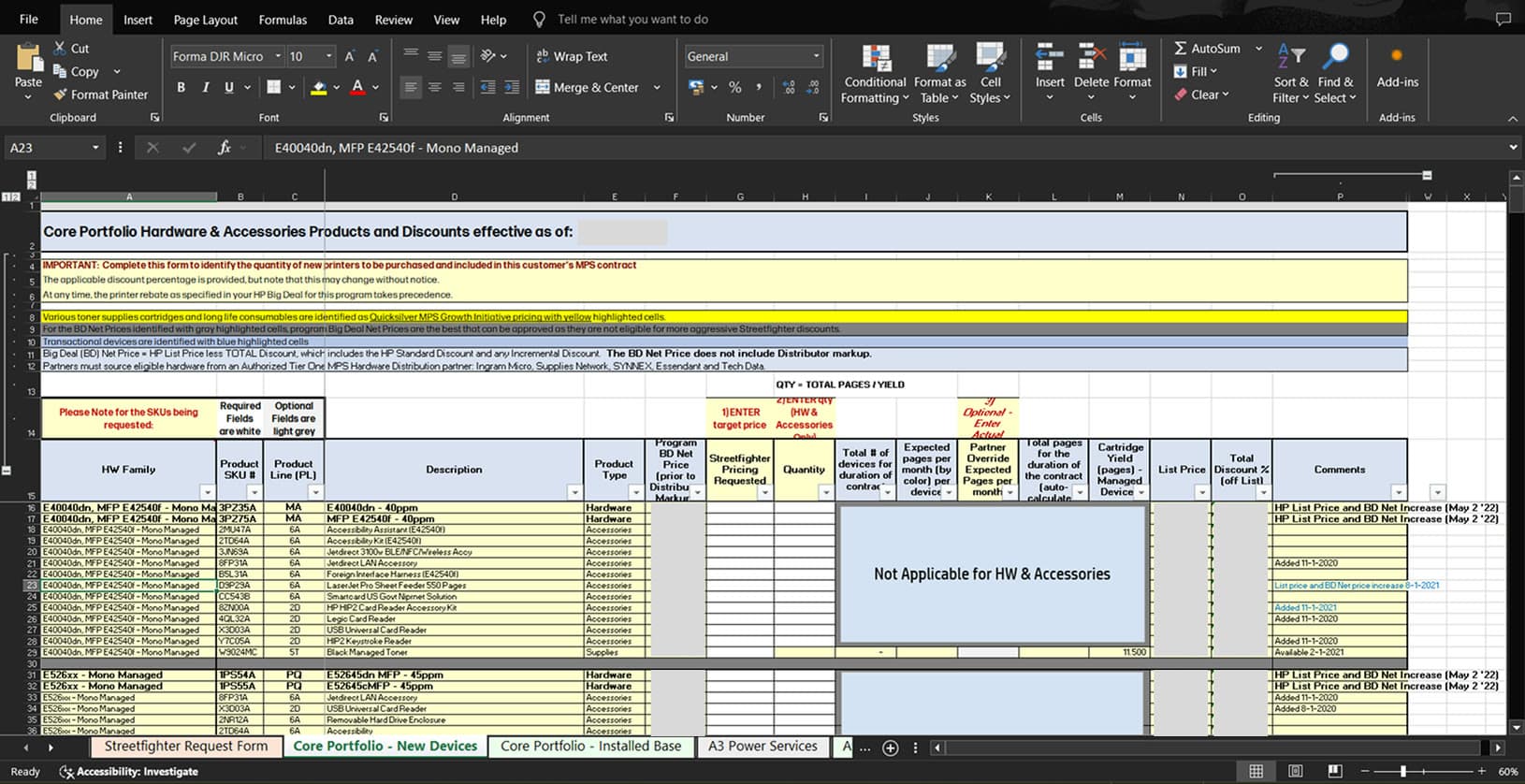
- Most users still worked in Excel to update the catalog or discuss a quote with external users, which led to unexpected data errors, time inefficiency, and knock-on effects throughout the process.
Outcome & Impact
40%
Faster quoting
Time to completion across the entire quoting process.
90%
Faster catalog updates
From two weeks down to a single day.
135 hrs
Saved per person, quarterly
Time returned to the work the tooling was getting in the way of.
90%
Adoption in North America and APJ
Of all HP resellers in both regions, on the catalog solution.
Challenges
- 01
Tool and data discrepancies
The regions had grown apart, each solving the same problem with different tools.
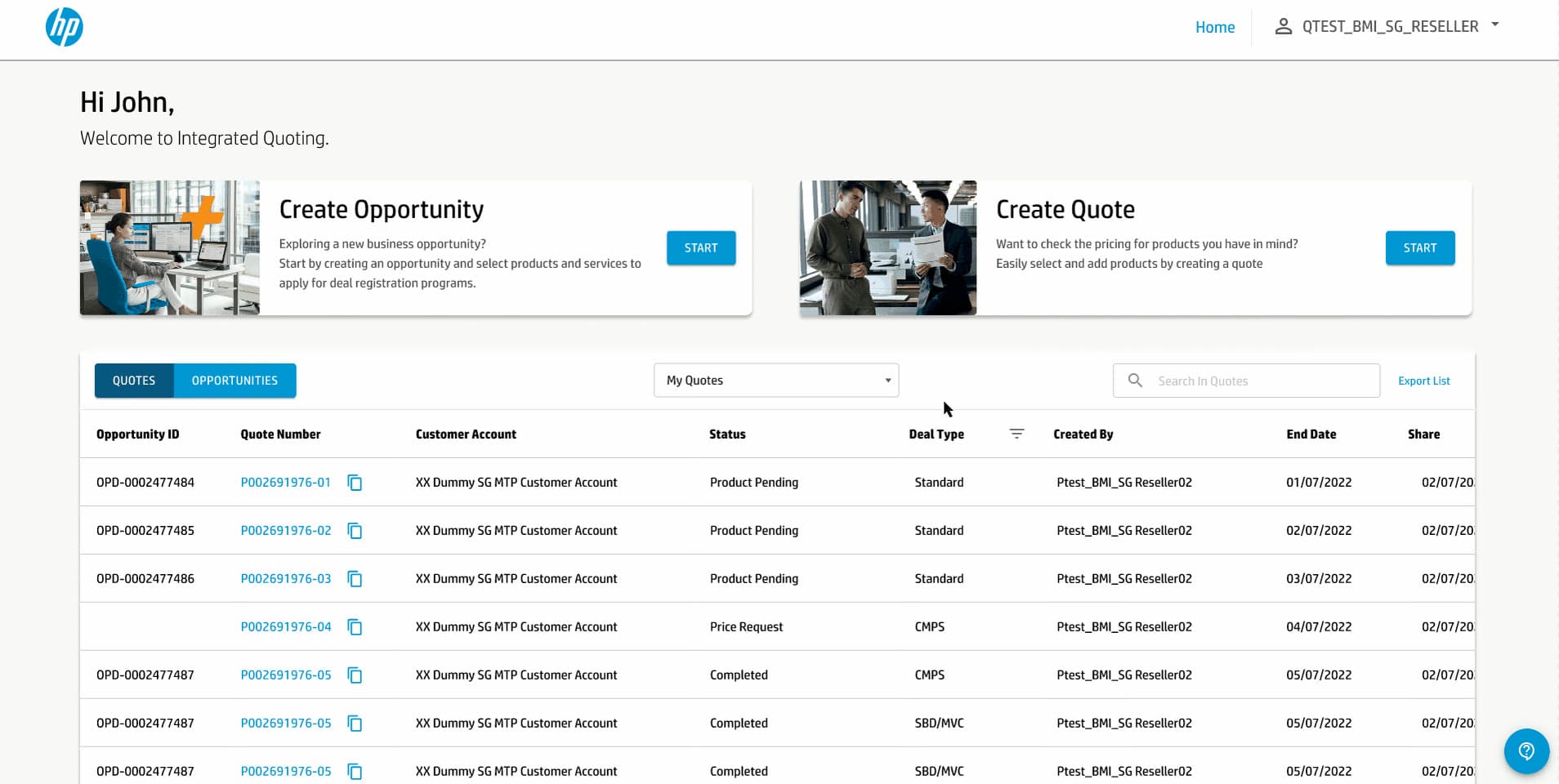
- In EMEA and Asia Pacific, external users worked in a legacy tool called Manage Print Central, which lacked flexibility in user experience and system scalability. Internal users relied on a separate tool for catalog order processing guidelines.
- In North America, internal users managed order processing guidelines and quoting manually in Excel spreadsheets, making it harder to align product and pricing information for external users.
- 02
Communication gap
Manual processes across markets within each region often led to incorrect product and pricing information reaching external users.
- 03
Complex legacy process
As a new designer in this print business, I focused on quickly understanding the legacy process to find ways to simplify future solutions.
How I thought about it
I came in assuming the answer was already half-built. EMEA and Asia Pacific ran on a legacy tool called Manage Print Central. North America ran on Excel forms. The obvious move was to take the European process, tidy it up, and roll it out everywhere.
Before committing to that I asked for design workshops through each region’s business process. What came back changed the shape of the problem. The friction wasn’t in the quoting screen at all. It was upstream, on the supply side. Every market inside every region defined its own products and pricing, even though the regional level had already agreed a standardised pricing baseline. Markets wanted their own workflow, and the baseline never survived contact with them. So the data arriving at the quote was already mismatched, and most of the time was going into calibrating products that were supposed to have been standardised weeks earlier.
That killed the port-Europe-everywhere plan. Shipping the European flow to North America would have replaced one broken input with a better-looking one.
We started with North America instead, because it was the market still working by hand in Excel, and we built the Catalog Management app first: a worldwide internal tool that wasn’t in the original brief at all. Products, pricing and partner information get aligned there, and an approval step gates what goes live, on quarterly cycles plus ad-hoc updates in between. Quoting inherits a catalog that is already correct, rather than trying to correct it at the point of sale. The same pattern went to the partner side, where an approval step sits in the quoting flow itself.
The partner-side approval step came later, from feedback after launch.
Design Strategy
- 01
Design workshops
Conducting user research to understand current user behavior and gather inspiration.
- 02
Define the core problem statement
How can we streamline catalog updates for internal users to ensure a seamless quoting experience for external users?
- 03
Information architecture across three regions
The regional pricing baseline already existed. What it lacked was a structure the markets would actually publish into. We mapped how each market defined its products, then built a catalog hierarchy that held the standard where it mattered and left room for local variation where insisting on uniformity would have pushed people back to spreadsheets. Within that structure, each internal team’s work was framed as a job to be done, so Print Category, Channel Market and MDM could each complete their part and hand off without navigating around the others.
- 04
Component-driven design system
Built a scalable, component-based design system in Figma to ensure visual consistency, maintain accessibility standards, and streamline future feature rollouts.
- 05
Bridging siloed systems
Designing a shared source of truth that aligns internal ops and external partners on one platform.
Design Decisions
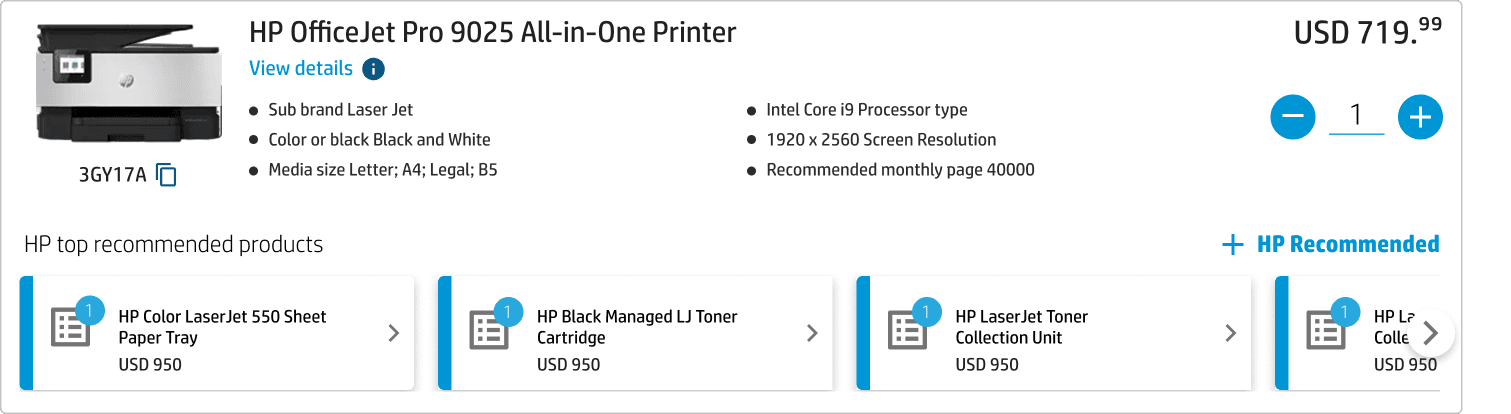
One of the design decisions that became a core UI component for quoting is the product block, where the information is added from the catalog app.
A quote is a list of these blocks, so the block is the atom of the whole tool: it is what a partner reads, what they price, and what they add to. Before its anatomy was settled I built three and put them one under another, because the choice was never cosmetic. It decided how much of the catalog a partner would ever see.
- A
The line item product, and nothing else

- Buys
- Shortest block on the page, so a long quote stays something you can hold in your head.
- Costs
- Sells nothing. A partner who does not already know a printer needs a toner collection unit never learns it here.
- B
The line item product, with recommendations offered

- Buys
- The companions exist and are one click away, without being forced on anyone.
- Costs
- The partner assembles them, item by item, on a page already holding twenty lines. Offered is not attached.
- C
The line item product, with its companions already on it
- Buys
- The compatible companions arrive attached, priced and countable, and the control to add more stays where it was.
- Costs
- Twice the height of A. Every hardware block costs double the page it used to.
- 01
Hardware blocks take C, and the catalog arrives attached
A partner quoting a printer is quoting a printer, a toner, a collection unit, a care pack and a piece of software, and only the first of those is the thing they came to buy. B makes them go and find the other four; C has them already on the block, priced, counted, and removable. The height is the price paid: a hardware block is now twice the page it was under A, and a long quote pays that on every one.
- 02
Companion blocks take A, and recommendations never nest
Every companion in that attached strip is itself a product with recommendations of its own. Giving companions design C would open a second catalog inside a block the partner has already accepted, and a third inside that. A ends the recursion: once something is a companion it is a name, a price and a quantity. This is also what pays for the decision above. The height C spends on hardware blocks is only affordable because companion blocks spend none.
- 03
Attached is not the same as hidden
Auto-attach only works if the partner can see what was attached. Each companion carries its own count and its own price on the face of the block, and the control that adds more sits where it sat in B. The cost is a busier block, carrying more numbers and more controls in a component that was already dense. The alternative was a quote total a partner could not account for, which is the one failure a quoting tool cannot have.
Auto-attach paid off twice. Revenue went up, because any compatible companion product, like a warranty, a care pack or a piece of software, is now attached to the hardware product automatically, and those relationships come from the product catalog for each user. It also improved usability and task success for add-to-quote, because the things a partner did want were on the block from the start. Most tradeoffs mean giving up one of those to get the other. This one did not, and the reason is the second decision: hardware blocks could afford the extra height because companion blocks take none.
The catalog side had a tradeoff of its own, and the budget made it. Search came out of the product setup module for the MVP, which would have left the worldwide and market category teams with no way to get their products in at all. So I held the development team to two things: an upload as the way in, so the module shipped usable rather than merely shipped, and search first in the queue the moment there was budget for it.
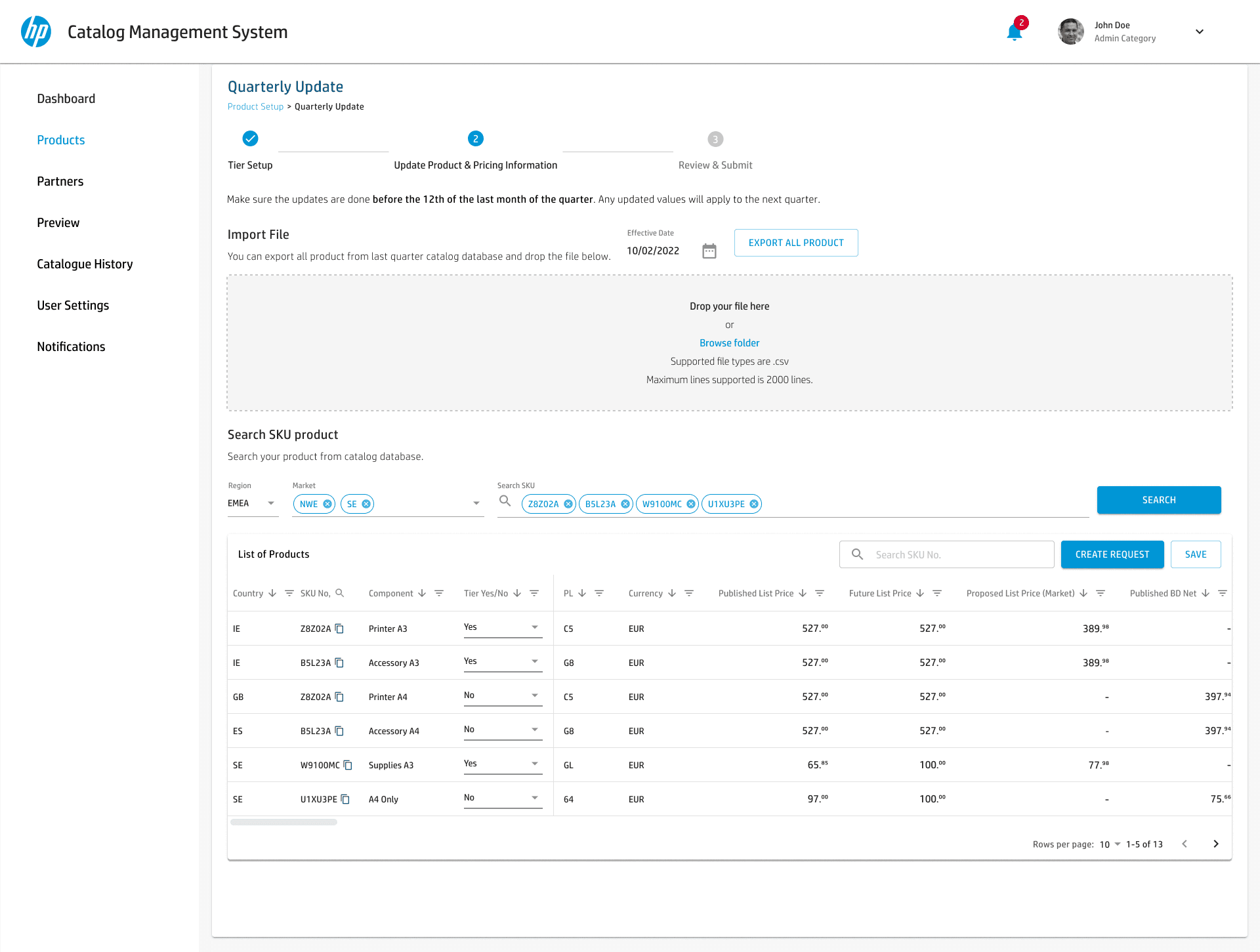
Product information is set in the Catalog Management System. A market team imports a file or searches its own SKUs, then sets prices per country. What a partner sees on a quote is whatever their market published.
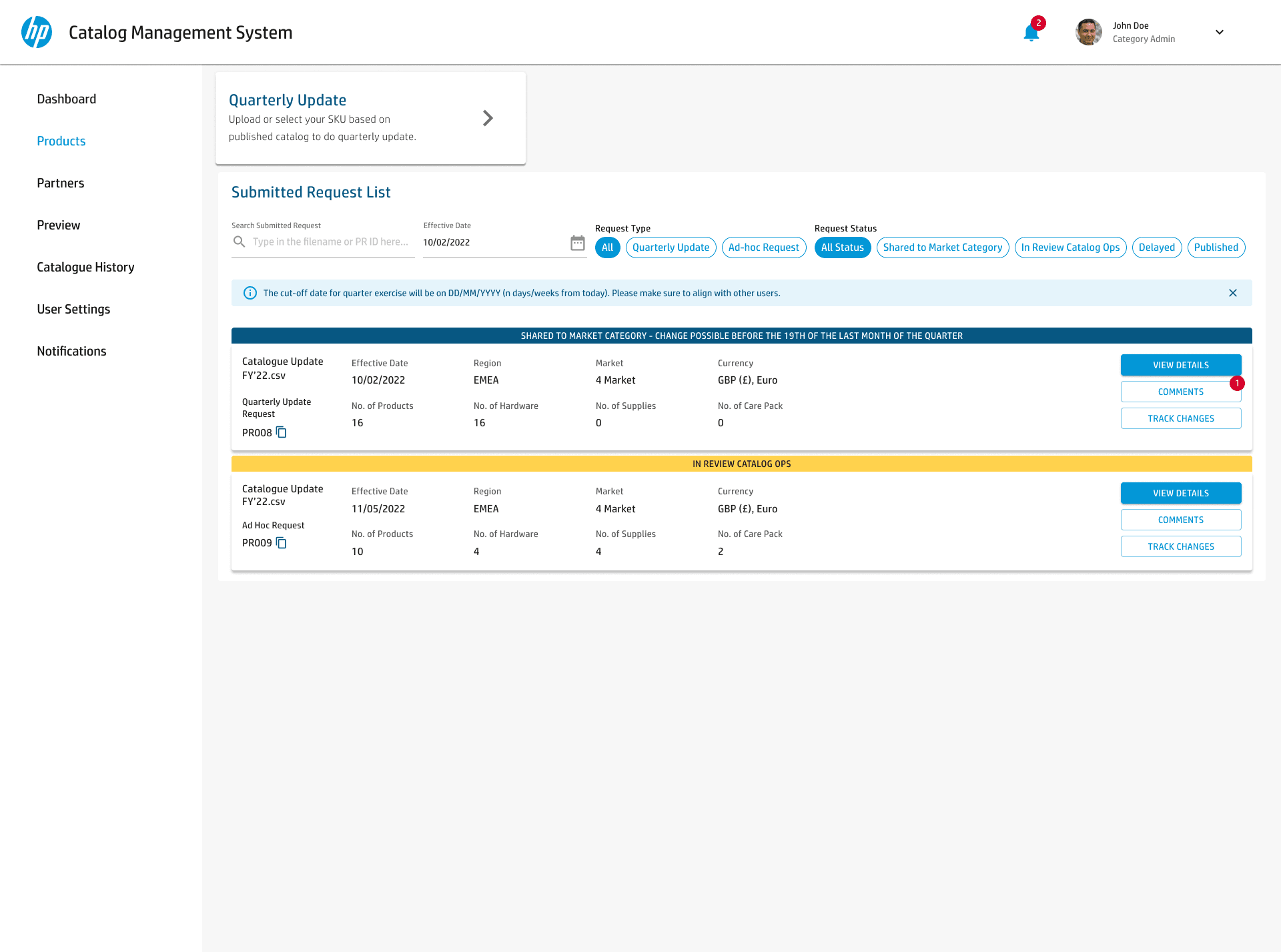
Every submitted request in one list, each carrying the state it is in: shared to market category, in review with catalog ops, delayed, published.
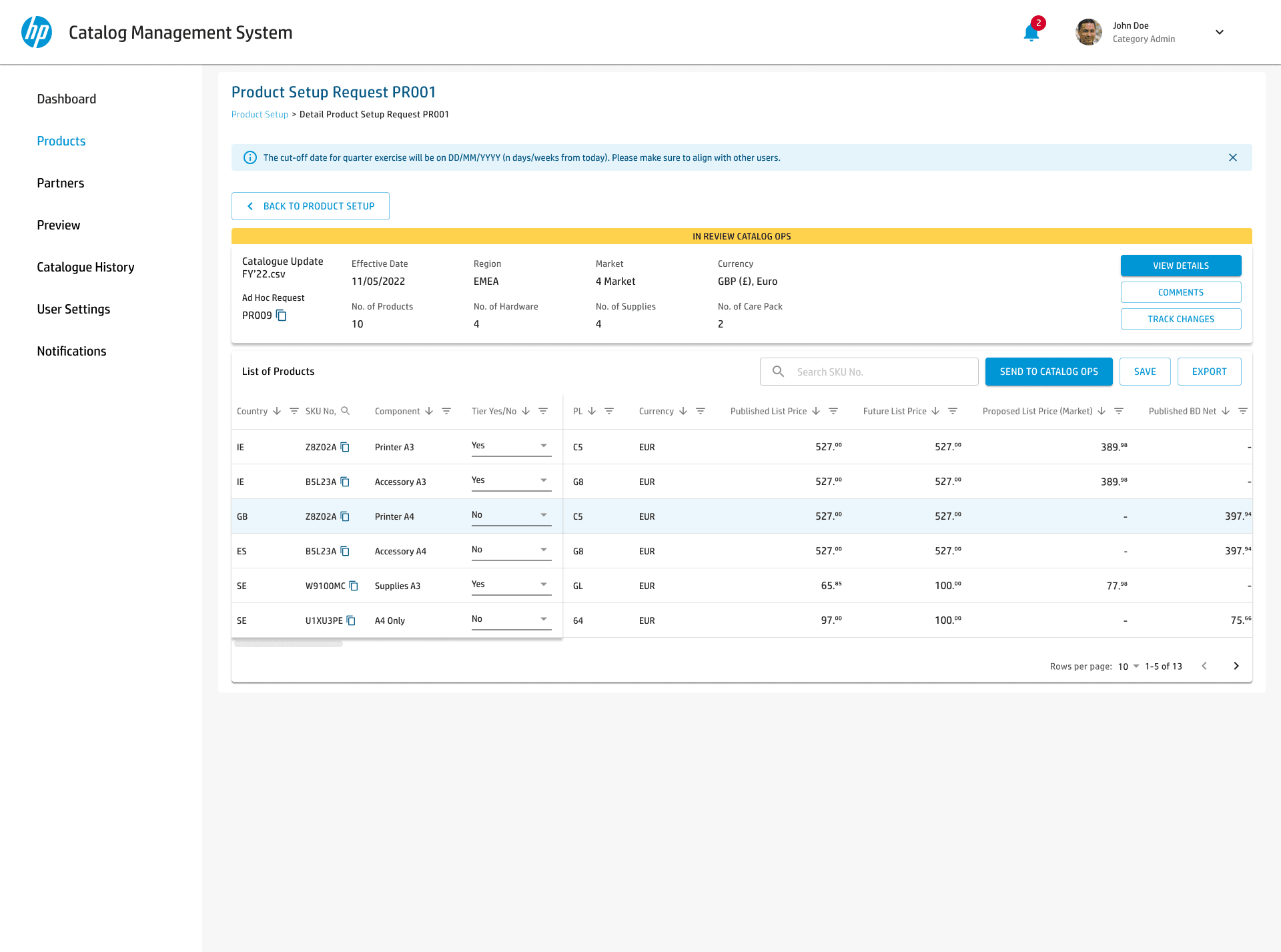
One request in detail, counted by hardware, supplies and care packs, on its way to catalog ops.
Showcase
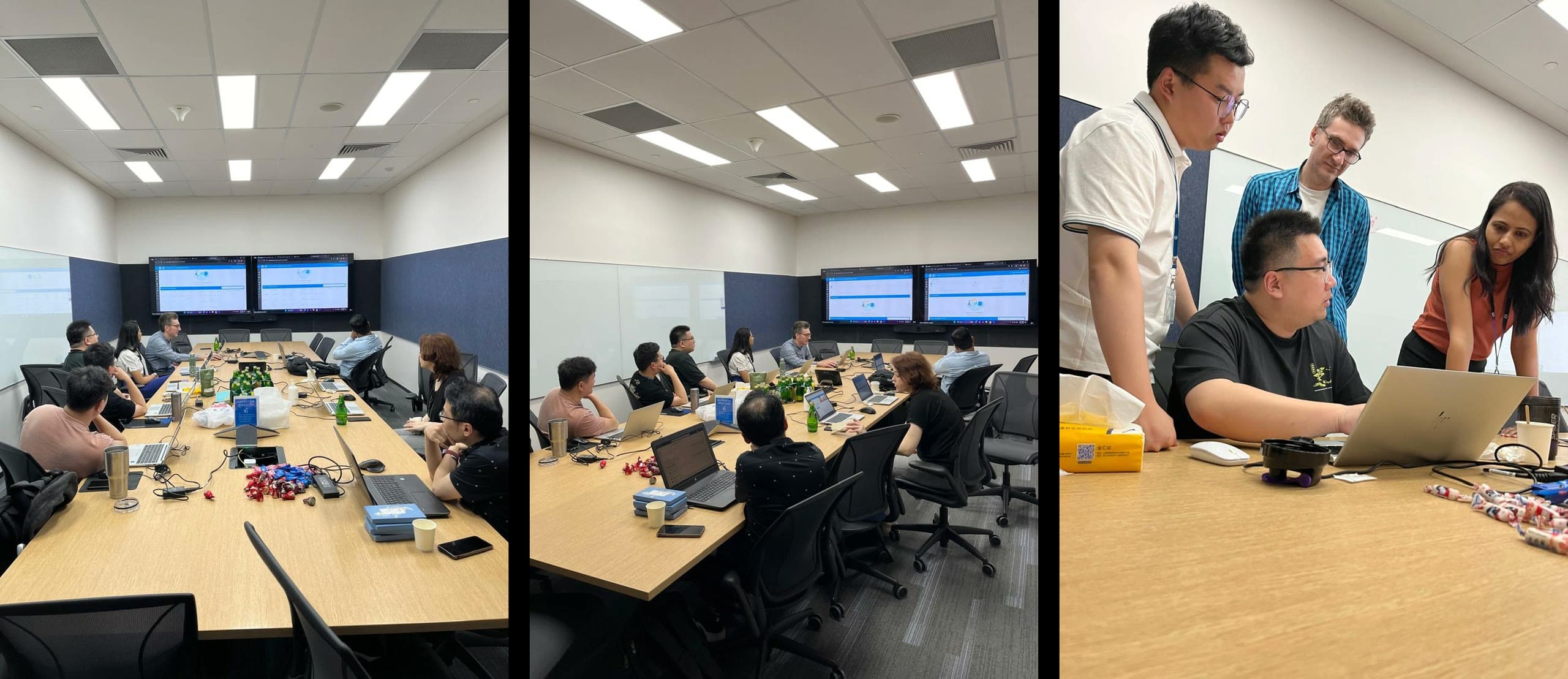
What users said
Partner and internal feedback, gathered before and after launch.